


AnyList: Grocery Shopping List
4.88.21K Reviews
App Specs
- Version
- Varies with Device
- Updated On
- License
- Free
- Downloads
- 1,000,000+
- Developer
- AnyList
- Categories
- Productivity
- Platform
- Android
Screenshots
 Analysis by AppCompare
Have you ever found yourself standing in the grocery store, completely blanking on what you needed to buy? I’ve been there, too. That’s why I decided to try out AnyList: Grocery Shopping List. It’s been a game changer for organizing my shopping trips, and I’m excited to share my experience with you.
First Impressions
The moment I opened AnyList, I was greeted with a sleek and intuitive interface. It’s the kind of app that doesn’t require a manual to figure out. Everything is laid out simply, with easy-to-read fonts and clear icons. Creating a new list was a breeze, and I immediately started jotting down items I remembered I needed.
Features That Stand Out
One of the first things that caught my eye was the voice input feature. I mean, how cool is it to just speak your list and watch it appear on your screen? This is especially handy when you’re cooking and don’t have a free hand to type.
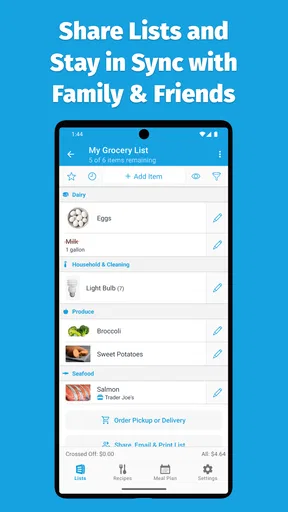
Another feature I love is the ability to share lists with family or roommates. It’s so convenient for coordinating who’s picking up what. Plus, you can set up notifications, so you’re always on top of what’s been added or purchased.
Organizing Made Simple
AnyList takes organization to the next level with its categorization feature. It automatically sorts items into categories like dairy, produce, and meats. This means no more zigzagging across the store—just one smooth trip down each aisle. You can also customize these categories, which is perfect if you have specific preferences or shop at multiple stores.
Organizing my grocery shopping has never been easier. AnyList saves me so much time and energy!
Recipe Saving and Meal Planning
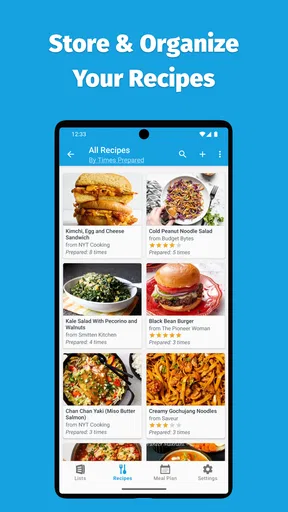
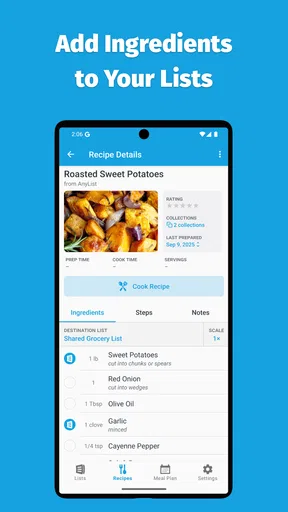
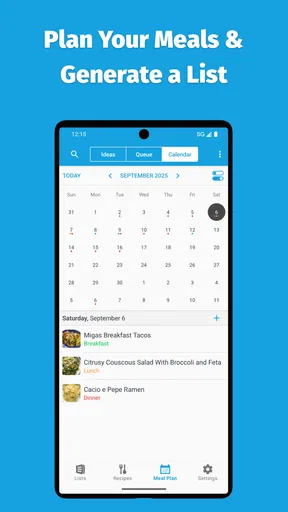
If you’re into meal planning, AnyList has you covered. You can save recipes directly in the app and even add the ingredients to your shopping list with just a click. It’s like having a personal assistant dedicated to meal prep.
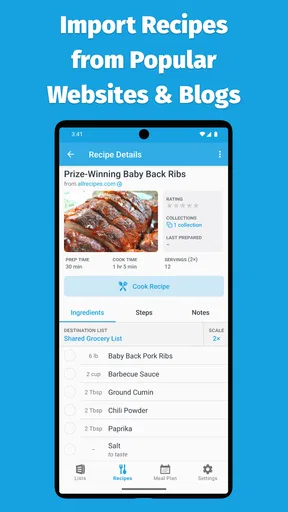
The app also allows you to import recipes from your favorite websites. I found this feature incredibly helpful when I stumbled upon a new dish I wanted to try. It’s seamless and keeps everything organized in one place.
Worth Reading Before You Choose

EA SPORTS FC Mobile 26 Is a Bigger Football Game, but It Takes Time

Flipboard Shows What News Apps Must Do Beyond the Feed

Switching to Android Auto Means Rethinking Your Driving Routine

Google Calendar Makes a Crowded Week Easier to Manage

Ludo King Makes the Most of the Minutes Between Plans

Baby Panda World Brings Quick Play to Modern Phones, but Its Game Library Feels Busy
Customizable Experience
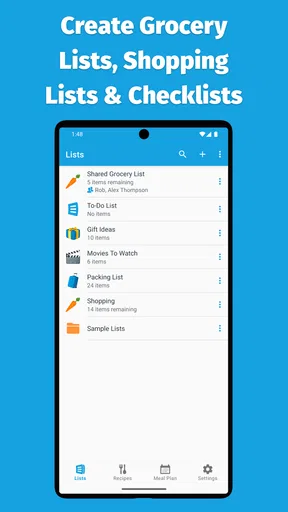
Personalization is key, and AnyList offers plenty of ways to make the app your own. You can customize list themes, add item photos, and even create multiple lists for different occasions. Whether it’s a holiday dinner or a weekly grocery run, you can tailor the app to suit your needs.
Availability and Accessibility
AnyList is available on both Android and iOS, and it also offers a web app, which means you can access your lists from any device. It syncs seamlessly across platforms, so you’ll always have the most updated list at your fingertips.
Another point worth mentioning is the app’s accessibility features. It supports voiceover and other assistive technologies, making it a user-friendly option for everyone.
From the First Week to a Lasting Routine
The early appeal is easy to understand: you can make a list quickly, share it, and see your groceries arranged in a more useful order. The harder test comes after the novelty wears off. For me, the lasting value depends less on trying every customization and more on whether the household keeps adding things as they run low. If everyone treats the shared list as the default place to note an empty carton or a missing staple, it can prevent the familiar last-minute guessing game.
A practical routine is to keep one main list for the next shop and add items at the moment you notice them, rather than trying to remember everything on shopping day. Then use separate lists only when there is a clear reason, such as a special meal or a different store. Too many lists can create the very uncertainty the app is meant to solve: you may remember the item but not which list it went on.
For a shared household, the useful question is not simply whether another person can see the list; it is whether they will actually use it. I’d agree on a simple habit—add an item when it runs out, and mark it off when it goes into the basket. Notifications can help people stay aware of changes, but too many alerts may feel distracting. A household that prefers to communicate everything face to face may get less out of sharing than people who shop at different times.
A More Deliberate Meal-Planning Workflow
Recipes are most helpful when they lead to a concrete shopping decision. I’d choose a few meals before making the weekly list, add their ingredients, and then check what is already in the kitchen. That last check matters: transferring ingredients is convenient, but it can still leave you with duplicates if you do not account for pantry supplies. For ingredients used in several dishes, I’d also review quantities rather than assume that a combined list automatically reflects exactly what the week requires.
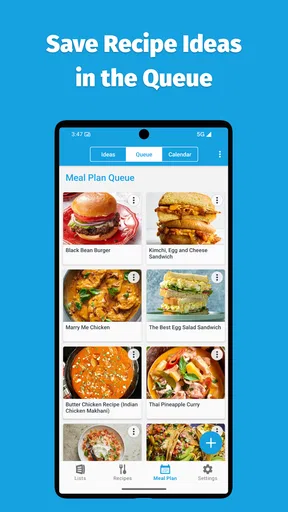
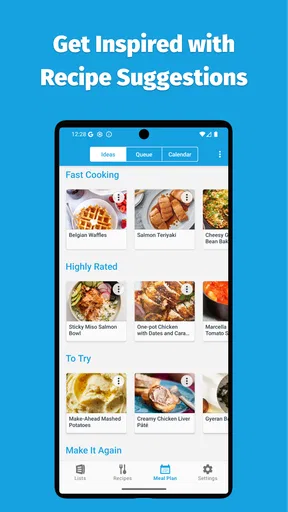
Recipe importing is a useful bridge between browsing for dinner inspiration and planning a shop, especially when you want to keep a dish for another week. It can also encourage overplanning. I find it more sustainable to save appealing recipes without treating every saved dish as a commitment. Pick meals that fit the time and energy you expect to have; the app can organize ingredients, but it cannot make an ambitious cooking plan realistic on a busy evening.
That distinction is where AnyList feels different from a plain notes app. A notes app is flexible and familiar, but it usually leaves you to manage formatting, categories, and the connection between recipes and groceries yourself. AnyList gives those kitchen tasks a more purposeful home. On the other hand, someone who only needs a short list of a few items may find ordinary notes faster and see little benefit in maintaining recipes and multiple lists.
Where Convenience Has Limits
Automatic categories can make a shop easier to navigate, but the ideal order is not identical for every shopper. Store layouts vary, and a person who shops in a particular route may prefer to adjust categories to match it. I’d spend a little time tuning the arrangement after a few trips instead of expecting the first setup to fit every supermarket. If you move between stores, separate lists or customized categories can be useful, though they add a small amount of upkeep.
Voice input is handy when hands are occupied, but it is not the best method in every setting. A noisy kitchen or public place can make speaking less convenient than tapping, and you still need to check that the intended item has been captured. I see it as an alternative for quick additions, not a reason to stop reviewing the list. Photos and themes can make lists more personal, but they are optional decoration rather than the core reason to keep using the app.
There is also a trade-off between having one shared source of truth and relying on every shopper to keep it current. If one person regularly forgets to mark purchases or another maintains a separate paper list, the household can end up with conflicting versions. That is not a flaw unique to this app; it is a habit problem. But it means AnyList works best when the people sharing it agree to use the same list consistently.
Who Will Get the Most From It?
I’d recommend it to people who shop for a household, coordinate errands with a partner or roommate, or like to plan meals before buying ingredients. Its mix of lists and recipes can be especially worthwhile for anyone who repeatedly cooks from saved online recipes and wants shopping to follow naturally from that planning. The app is free to start, is rated for Everyone, and is developed by AnyList. Its average rating is 4.8 from around 29,000 ratings, with more than a million installs, which suggests it has found a broad audience without making it the right fit for every routine.
AnyList is less compelling if you rarely shop, buy the same few things every time, or dislike maintaining digital lists. A paper note may be more dependable for someone who does not want a phone involved in the store. Likewise, a general task manager may suit people who want groceries mixed with work reminders and household chores. I would choose AnyList when grocery planning and recipes deserve their own workflow, not simply because a digital list sounds more modern.
On Android, the listed current version is 2.0.10 and the minimum operating system is 5.0. The app is free, with in-app purchases ranging from $9.99 to $14.99 per item. I’d start with the free experience and see whether shared planning and recipe organization become part of your routine before deciding whether a purchase makes sense. That is a more useful test than paying for features before you know which habits will stick.
Final Thoughts
After using AnyList for a few weeks, I can confidently say it’s a must-have tool for anyone looking to streamline their grocery shopping. It’s packed with features that make life easier, from voice input and list sharing to recipe saving and meal planning. The ease of use and customization options are just the cherries on top.
So, if you’re tired of forgetting items or wasting time in the grocery store, give AnyList: Grocery Shopping List a try. It’s more than just a shopping list app—it’s a personal assistant for your kitchen adventures.
My longer-term verdict is a little more specific: it earns a regular place on my phone when I use it as a shared household routine, not just as a novelty list-maker. The best reason to keep it is the connection between everyday grocery reminders and meals you genuinely intend to cook. If that connection fits your life, the small effort of keeping lists current can pay back on each shop. If it does not, a simpler list may be all you need.
Pros
- User-friendly interface
- Syncs across devices
- Customizable lists
- Recipe import feature
- Barcode scanning
Cons
- Limited free version
- No offline access
- Ads in free version
- Requires account setup
- Occasional sync issues
FAQs for AnyList: Grocery Shopping List
What is AnyList and how does it work?
AnyList is a comprehensive application designed to streamline your grocery shopping experience. Users can create detailed shopping lists, categorize items, and share lists with family or friends. The app also allows you to save and organize your favorite recipes, automatically adding ingredients to your shopping list with a single tap.
Is AnyList available on both Android and iOS devices?
Yes, AnyList is available for both Android and iOS platforms. The app provides a seamless experience across devices, ensuring that your lists and recipes are synchronized in real-time, whether you're using your smartphone or tablet. This cross-platform availability makes it a versatile tool for all users.
Does AnyList offer features for dietary restrictions and preferences?
Absolutely. AnyList allows users to customize their shopping lists and recipes to accommodate various dietary needs and preferences. You can tag ingredients, create notes, and adjust serving sizes to ensure that all items meet your specific dietary requirements, making meal planning more efficient and personalized.
Can I share my shopping lists with others using AnyList?
Yes, AnyList makes it easy to share your shopping lists with family, friends, or roommates. The app supports real-time collaboration, allowing multiple users to view and edit the list simultaneously. This feature ensures everyone stays updated on what items are needed, reducing duplication and miscommunication.
Is there a cost associated with using AnyList, and are there premium features?
AnyList offers a free version with essential features. However, for users seeking enhanced functionality, there is a premium subscription available. The premium version includes features like advanced list organization, recipe web importing, and list themes. Subscribing unlocks a more robust experience for avid users.


